Apple Wallet and Google Wallet boarding passes
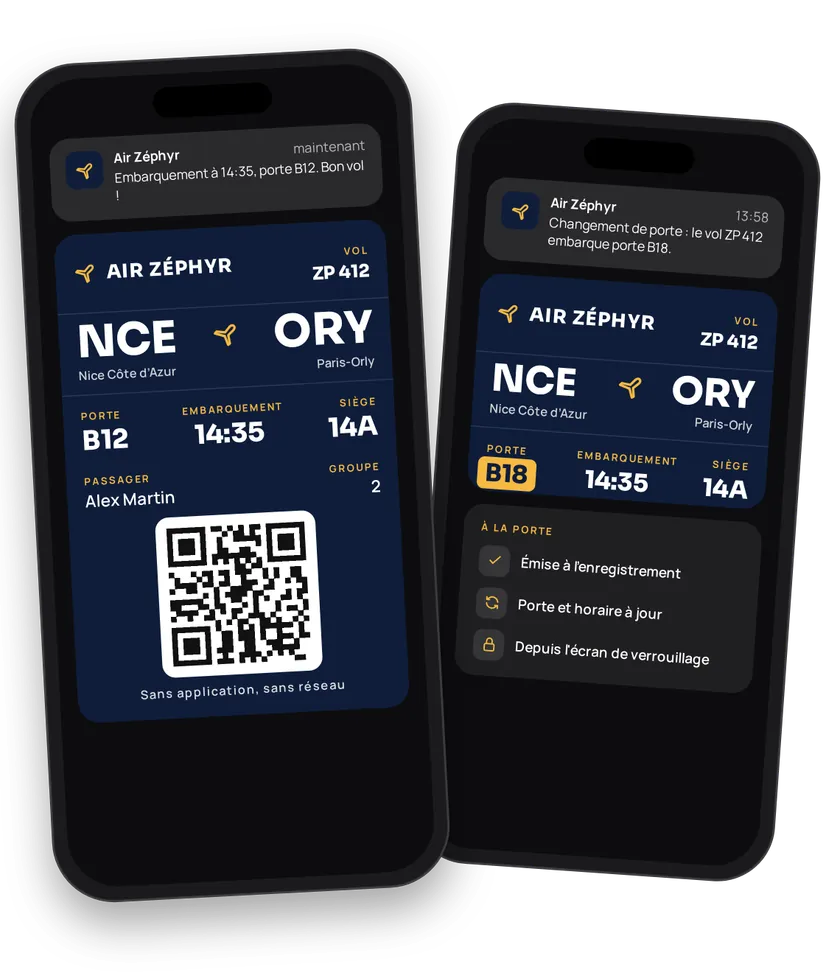
At the airport, passengers look for three things: their gate, their boarding time, their seat. A boarding pass in Apple Wallet or Google Wallet shows them at a glance, from the lock screen, with no app and no network. You issue the pass at check-in, update it if the gate or time changes, and the passenger shows it at security and at the gate.
Try this pass liveFill in the form, watch the pass and the code update, then get it on your phone.Customer journey
Integration workflow
- Create the routeBack office
Boarding passes use transits with the
Airtype. One template per route: origin and destination airports (IATA codes and names), reference times, terms, customer service number, colors, strip.PDF_417is the standard boarding pass barcode.- curl
- SDK Node.js
- nodejs
- php
- python
- java
- csharp
- go
- ruby
- CURL
curl -L 'https://api-v2.test.eldowallet.fr/transits' \
-H 'Accept: application/json' \
-H 'x-lang: en' \
-H 'Authorization: Bearer <token>' \
-F 'strip=@"cabin.png"' \
-F 'type="Air"' \
-F 'number="204"' \
-F 'originStationCode="CDG"' \
-F 'originName="Paris Charles de Gaulle"' \
-F 'destinationStationCode="JFK"' \
-F 'destinationName="New York JFK"' \
-F 'departureTime="10:40"' \
-F 'arrivalTime="13:05"' \
-F 'details="Boarding starts 40 minutes before departure."' \
-F 'terms="Named boarding pass. Please carry ID."' \
-F 'barcodeFormat="PDF_417"' \
-F 'colors="{\"backgroundColor\":\"\#1c1c3a\",\"labelColor\":\"\#9ee00d\",\"foregroundColor\":\"\#ffffff\"}"' - The passenger checks inEnd customer
On your website, app or at the counter.
- Issue the boarding passYour server
One call per passenger: identity, email, flight date,
flightNumber,gate,seat, barcode. Use onetripNumberper flight and date (for exampleEW204-20261112): that's what lets you update every passenger at once.- curl
- SDK Node.js
- nodejs
- php
- python
- java
- csharp
- go
- ruby
- CURL
curl -L 'https://api-v2.test.eldowallet.fr/transits/$TRANSIT_ID/passes' \
-H 'Accept: application/json' \
-H 'Content-Type: application/json' \
-H 'x-lang: en' \
-H 'Authorization: Bearer <token>' \
--data-raw '{
  "firstName": "Julie",
  "lastName": "Moreau",
  "email": "julie.moreau@example.com",
  "departureDate": "2026-11-12",
  "arrivalDate": "2026-11-12",
  "flightNumber": "EW 204",
  "tripNumber": "EW204-20261112",
  "gate": "K42",
  "seat": "23A",
  "barcode": "M1MOREAU/JULIE EW204",
  "enableSendEmailOrSms": true
}' - The passenger adds the passEnd customer
It works offline and shows up on the lock screen on the day of the flight.
- Delay or gate changeYour server
Delay: update the times for the whole flight by its
tripNumber. Gate change: the gate is stored on each pass, so update the passes in bulk. Add a message to explain: "Gate K42 changed to L12". - Check at the gateYour server
The reader scans the barcode. Look up the pass, then redeem it to record boarding.
Best practices
- One
tripNumberper flight and date. EW 204 on the 12th and EW 204 on the 13th are two different flights. - Use IATA codes. Station codes are shown large on the pass. Full names go in secondary fields.
- Check barcode readability. Test your gate readers with a phone on auto-brightness before launch.
- Connections. Issue one pass per segment, each with its own
tripNumber.
Go further
- Transport & mobility
- Update a trip
- Barcodes
- Apple Wallet or Google Wallet
- Endpoints: POST
/transitsPOST/transits/{transitId}/passesPATCH/transits/{transitId}/passes/bulkPOST/passes/template/{templateId}/redeem/{barcode}
Get inspired
A boarding pass can do much more than get passengers through the gate. Here are ideas to enrich your passengers’ journey.
Like one of these ideas? Contact our team and we'll show you how to set it up.