Membership cards for associations in Apple Wallet and Google Wallet
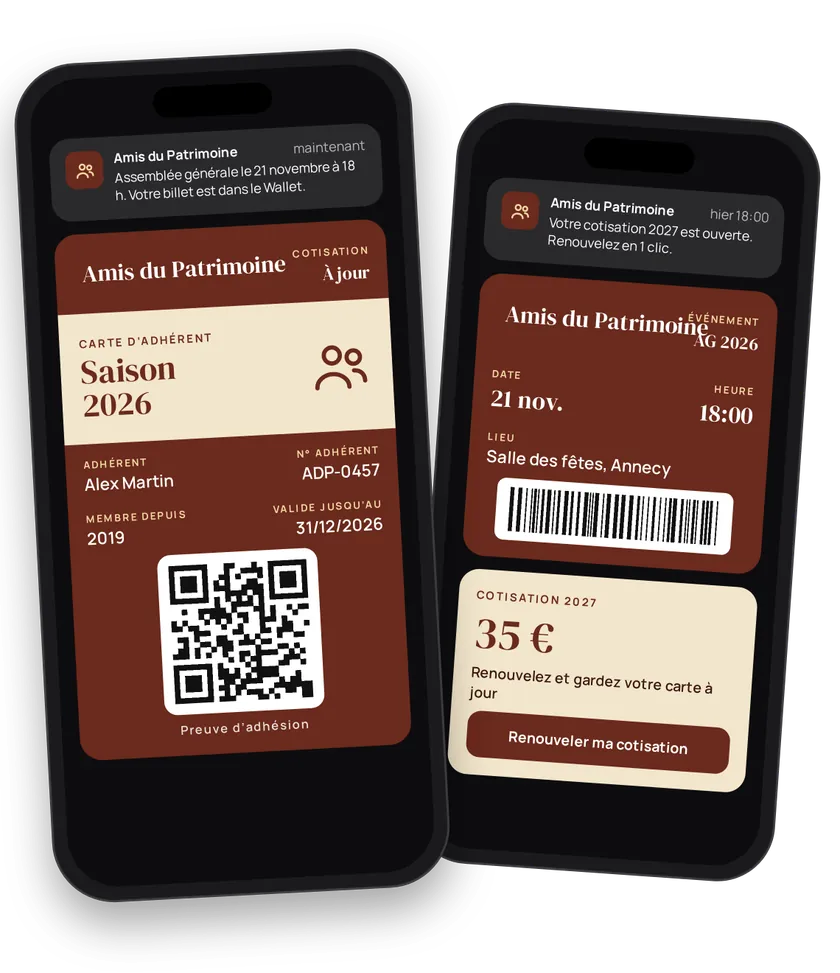
An association lives through its members. Every year you chase renewals, print cards, post them, announce the general meeting. A member card in Apple Wallet or Google Wallet does it all at once: proof of membership, a direct information channel and a ticket for your events. You import your member list once, then keep it up to date.
Try this pass liveFill in the form, watch the pass and the code update, then get it on your phone.Customer journey
Integration workflow
- Set up the member cardBack office
Pick
MEMBER_CARD, show the association (ASSOCIATION) and the member number (N_ADHERENT). On iPhone, show the category in the header (iosHeaderset toTYPE). Keep the same card from one year to the next: only the category and the renewal date change. Add your contacts and website on the wallet.- curl
- SDK Node.js
- nodejs
- php
- python
- java
- csharp
- go
- ruby
- CURL
curl -L -X PATCH 'https://api-v2.test.eldowallet.fr/store-cards' \
-H 'Accept: application/json' \
-H 'x-lang: en' \
-H 'Authorization: Bearer <token>' \
-F 'strip=@"gardens.png"' \
-F 'cardType="MEMBER_CARD"' \
-F 'programName="Member card"' \
-F 'barcodeType="QR_CODE"' \
-F 'startRow="ASSOCIATION"' \
-F 'endRow="N_ADHERENT"' \
-F 'iosHeader="{\"labelEnum\":\"CUSTOM_TEXT\",\"customLabel\":\"Category\",\"valueEnum\":\"TYPE\"}"' \
-F 'validity="{\"expirationType\":\"NO_EXPIRATION\"}"' \
-F 'sharingProhibited="true"' \
-F 'sharingProhibitedAndroid="true"' \
-F 'colors="{\"backgroundColor\":\"\#2f4a1f\",\"labelColor\":\"\#f4d35e\",\"foregroundColor\":\"\#ffffff\"}"' - One category, one client typeBack office
Active member, supporter, youth, volunteer, honorary member: each category becomes a client type. You then target your messages by category. See Client types.
- Import the member listYour server
You already have a spreadsheet or an export from your membership software: import it as CSV. The import runs in the background. With
sendNotificationsToCustomers: true, each member gets their card. For a regular sync, use bulk creation in JSON (up to 5,000 rows per call). See Import a customer base.- curl
- SDK Node.js
- nodejs
- php
- python
- java
- csharp
- go
- ruby
- CURL
curl -L 'https://api-v2.test.eldowallet.fr/csv-operations/import-csv' \
-H 'Accept: application/json' \
-H 'x-lang: en' \
-H 'Authorization: Bearer <token>' \
-F 'file=@"members-2026.csv"' \
-F 'sendNotificationsToCustomers="true"' - Issue the card for each new memberYour server
When the fee comes in, your software creates the member with their number as the barcode, their category, admission date and renewal date.
- curl
- SDK Node.js
- nodejs
- php
- python
- java
- csharp
- go
- ruby
- CURL
curl -L 'https://api-v2.test.eldowallet.fr/clients' \
-H 'Accept: application/json' \
-H 'Content-Type: application/json' \
-H 'x-lang: en' \
-H 'Authorization: Bearer <token>' \
--data-raw '{
  "firstName": "Paul",
  "lastName": "Garnier",
  "email": "paul.garnier@example.com",
  "barcode": "2026-0318",
  "clientType": "$SUPPORTER_TYPE_ID",
  "admissionDate": "2026-09-01T00:00:00.000Z",
  "renewalDate": "2027-08-31T00:00:00.000Z",
  "source": "CRM",
  "sendCard": true
}' - The member adds the cardEnd customer
They show it at an activity or at a partner's, even offline.
- Remind those who haven't added their cardYour server
A week after the import, remind members whose card isn't installed: all of them, or a specific list.
- Keep members informedBack office
General meeting notice, call for volunteers, activity moved to a new venue: a notification to all members, or to one category (
target: SPECIFIC). For a campaign (fundraiser, open day), create a communication: the card's strip changes for the period. See Push notifications.- curl
- SDK Node.js
- nodejs
- php
- python
- java
- csharp
- go
- ruby
- CURL
curl -L 'https://api-v2.test.eldowallet.fr/push-notifications' \
-H 'Accept: application/json' \
-H 'Content-Type: application/json' \
-H 'x-lang: en' \
-H 'Authorization: Bearer <token>' \
-d '{
  "defaultTitle": "General meeting",
  "defaultMessage": "General meeting on 14 March at 6 pm, village hall. Your vote counts.",
  "target": "ALL",
  "type": "SCHEDULED",
  "category": "INFORMATIVE",
  "scheduleAt": "2027-02-28T09:00:00.000Z"
}' - Tickets for your eventsYour server
Annual party, outing, tournament, talk: create an event, then issue a ticket to each person who signs up. Pass the member's
clientIdto link the ticket to their record. Outside guests get a ticket without being members. See Events & trade fairs.- curl
- SDK Node.js
- nodejs
- php
- python
- java
- csharp
- go
- ruby
- CURL
curl -L 'https://api-v2.test.eldowallet.fr/events/$EVENT_ID/passes' \
-H 'Accept: application/json' \
-H 'Content-Type: application/json' \
-H 'x-lang: en' \
-H 'Authorization: Bearer <token>' \
--data-raw '{
  "firstName": "Paul",
  "lastName": "Garnier",
  "email": "paul.garnier@example.com",
  "clientId": "$CLIENT_ID",
  "leftRow": "Member",
  "rightRow": "Table 4"
}' - Check people inYour server
At the door, scan the ticket and redeem it. A second scan returns
PASS_ALREADY_REDEEMED. - Yearly renewalYour server
A month before the membership year ends, schedule a reminder to the members concerned. When the fee comes in, update the renewal date and, if needed, the category. The installed card updates.
- curl
- SDK Node.js
- nodejs
- php
- python
- java
- csharp
- go
- ruby
- CURL
curl -L -X PATCH 'https://api-v2.test.eldowallet.fr/clients/$CLIENT_ID' \
-H 'Accept: application/json' \
-H 'Content-Type: application/json' \
-H 'x-lang: en' \
-H 'Authorization: Bearer <token>' \
-d '{
  "renewalDate": "2028-08-31T00:00:00.000Z",
  "clientType": "$ACTIVE_MEMBER_TYPE_ID"
}'
Best practices
- Member number as the barcode. It's the number in your register: no mapping table.
- One card, many years. On renewal, update the existing card rather than issuing a second one.
- Only what's needed on the card. Name, number, category. Everything else stays in your membership software.
- Useful messages. General meeting, activities, volunteering:
INFORMATIVE. A partner's offer isCOMMERCIAL. Respect each member's communication preferences. - Clean the file before importing. One unique email and member number per row: duplicates are rejected.
Go further
- Events & trade fairs for tickets
- Health insurance for another member card
- Import a customer base
- Client types
- Push notifications
- Endpoints: POST
/csv-operations/import-csvPOST/clientsPATCH/clients/{id}POST/push-notificationsPOST/events/{id}/passes
Get inspired
The member card can keep your association alive all year round. Here are ideas to keep your members engaged.
Like one of these ideas? Contact our team and we'll show you how to set it up.