Garage loyalty cards in Apple Wallet and Google Wallet
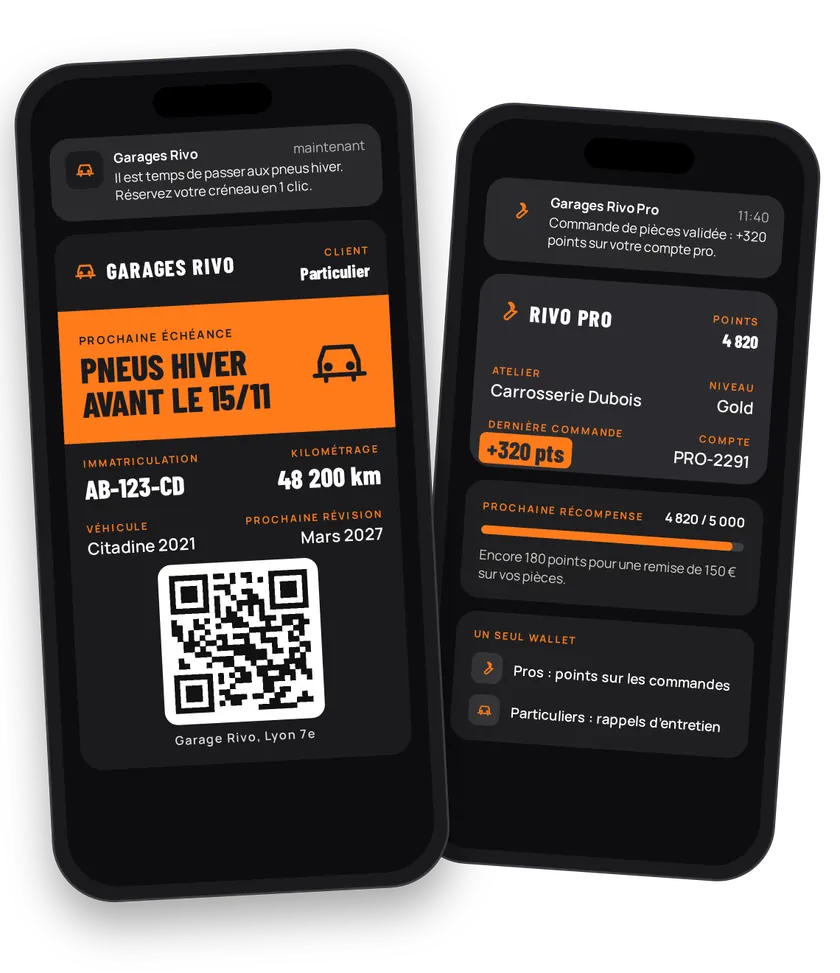
In automotive, you engage two audiences. The trade customer (mechanic, body shop) wants a points program on parts orders. The private customer wants a nudge when the car is due for a service or a tyre change. eldo wallet handles both from the same wallet, with an Apple Wallet or Google Wallet card that shows the plate number and the next due date.
Try this pass liveFill in the form, watch the pass and the code update, then get it on your phone.Customer journey
Integration workflow
- Set up the cardBack office
Pick
MEMBER_CARD, thePOINTSgain unit and the displayed fields: the right-hand field can show the plate number (N_IMMATRICULATION), the left-hand one the gain.- curl
- SDK Node.js
- nodejs
- php
- python
- java
- csharp
- go
- ruby
- CURL
curl -L -X PATCH 'https://api-v2.test.eldowallet.fr/store-cards' \
-H 'Accept: application/json' \
-H 'x-lang: en' \
-H 'Authorization: Bearer <token>' \
-F 'cardType="MEMBER_CARD"' \
-F 'programName="Garage Central Club"' \
-F 'gainUnit="POINTS"' \
-F 'gainLabel="POINTS"' \
-F 'startRow="GAIN"' \
-F 'endRow="N_IMMATRICULATION"' \
-F 'colors="{\"backgroundColor\":\"\#263238\",\"labelColor\":\"\#9ee00d\",\"foregroundColor\":\"\#ffffff\"}"' - Separate trade and private customersBack office
Create one client type per audience: "Trade", "Private". You then target each audience separately. See Client types.
- Enroll the trade customerYour server
The sales rep visits a garage. A button in your CRM creates the client with the "Trade" type and
sendCard: true. The owner gets the card within 30 seconds. Same flow from your trade extranet.- curl
- SDK Node.js
- nodejs
- php
- python
- java
- csharp
- go
- ruby
- CURL
curl -L 'https://api-v2.test.eldowallet.fr/clients' \
-H 'Accept: application/json' \
-H 'Content-Type: application/json' \
-H 'x-lang: en' \
-H 'Authorization: Bearer <token>' \
--data-raw '{
  "firstName": "Karim",
  "lastName": "Haddad",
  "email": "karim@garage-haddad.example.com",
  "phoneNumber": "+33612345678",
  "companyName": "Garage Haddad",
  "clientType": "$TRADE_TYPE_ID",
  "source": "CRM",
  "sendCard": true
}' - Personalise the private customer's cardYour server
Add the vehicle model, the next service date and a booking link to the back of the card (
additionalInformations). A per-customer strip is possible too.- curl
- SDK Node.js
- nodejs
- php
- python
- java
- csharp
- go
- ruby
- CURL
curl -L -X PATCH 'https://api-v2.test.eldowallet.fr/clients/$CLIENT_ID/specific' \
-H 'Accept: application/json' \
-H 'x-lang: en' \
-H 'Authorization: Bearer <token>' \
-F 'additionalInformations="[{\"title\":\"Vehicle\",\"value\":\"Peugeot 308, AB-123-CD\",\"kind\":\"TEXT\"},{\"title\":\"Next service\",\"value\":\"March 2027\",\"kind\":\"TEXT\"},{\"title\":\"Book a slot\",\"value\":\"https://garage-central.example.com/booking\",\"kind\":\"URL\"}]"' - Credit points on every orderYour server
Your ordering system sends the gain after each validated invoice. The balance updates on the trade customer's card.
- Launch the campaign of the monthBack office
Brake campaign, new injector, winter tyres: create a communication with its visual and period. The cards' strip changes during the campaign. Target a points range (
minPoints,maxPoints) to keep an offer for your best trade customers. Then notify the network. - Send service remindersYour server
Your workshop CRM detects vehicles due for service and sends a
SPECIFICnotification with a personal message per customer: "Your service is coming up, book a slot." - Reward and win backYour server
2,000-point tier: reward coupon. No order in 60 days: win-back coupon. The coupon is redeemed at the counter.
- Measure the networkYour server
Compare orders and average basket for card holders and non-holders in your ERP.
Best practices
- One wallet, two client types. Don't mix B2B and B2C messages: client types keep the two audiences apart.
- The service reminder is your best message. It's useful, personal and expected: tag it
INFORMATIVE. Keep promotions (COMMERCIAL) for trade customers. - One communication at a time. Two communications overlapping on the same period are rejected (
OVERLAPPING_COMMUNICATIONS). - QR codes on catalogs. Print the back-office sign-up QR code on your catalogs and point-of-sale material. No development needed.
Go further
- Client types
- Import a customer base
- Push notifications
- Endpoints: POST
/clientsPATCH/clients/{id}/specificPATCH/clients/{id}/gainPOST/communications
Get inspired
For trade customers and drivers alike, the Wallet card can follow the whole life of the vehicle. Here are ideas to go further.
Like one of these ideas? Contact our team and we'll show you how to set it up.