Cinema tickets in Apple Wallet and Google Wallet
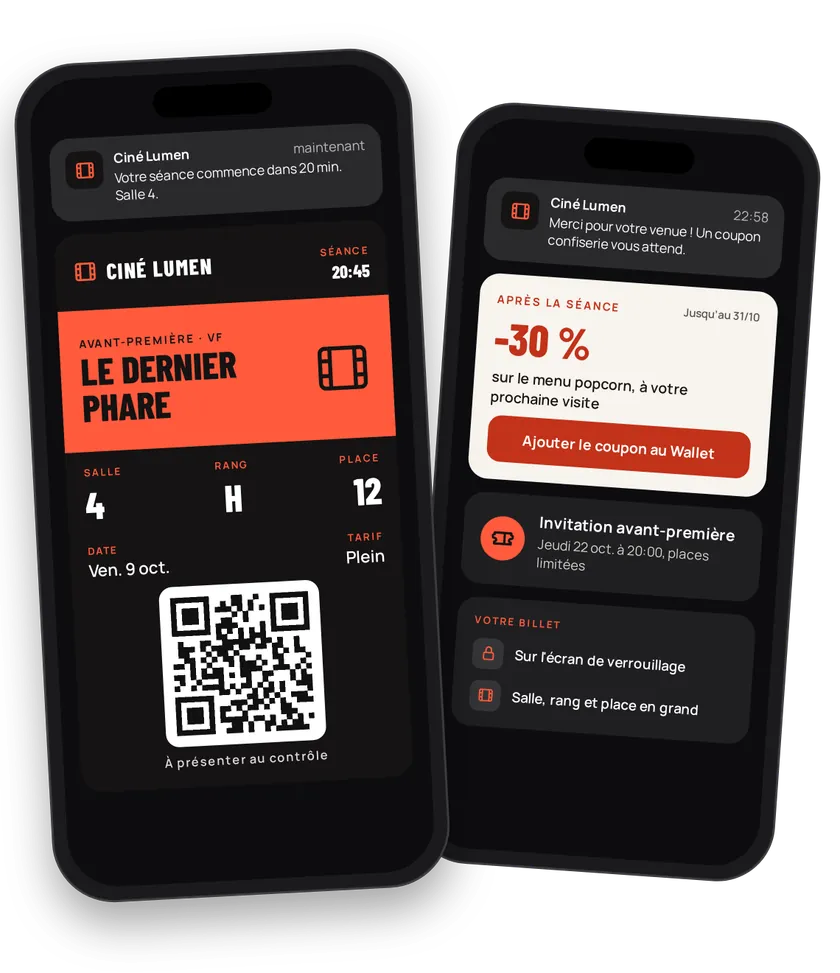
The moviegoer buys a seat on the subway, arrives five minutes before the show and digs for the email. With a ticket in Apple Wallet or Google Wallet, they open the lock screen and walk in. Screen, row and seat are shown in large type. After the film, a snack coupon or an invitation to the next preview brings them back.
Try this pass liveFill in the form, watch the pass and the code update, then get it on your phone.Customer journey
Integration workflow
- Create the screeningYour server
A screening is an event: film in
name, synopsis indescription, start and end times, price, terms, cinema address and poster as the strip. The three seating labels become Screen (ZONEon the left), Row (ROWin the center) and Seat (SEATon the right). Create it automatically from your programming.- curl
- SDK Node.js
- nodejs
- php
- python
- java
- csharp
- go
- ruby
- CURL
curl -L 'https://api-v2.test.eldowallet.fr/events' \
-H 'Accept: application/json' \
-H 'x-lang: en' \
-H 'Authorization: Bearer <token>' \
-F 'strip=@"poster.jpg"' \
-F 'name="Screening 8:45 pm"' \
-F 'barcodeType="QR_CODE"' \
-F 'date="{\"startDate\":\"2026-11-14T19:45:00.000Z\",\"endDate\":\"2026-11-14T22:00:00.000Z\"}"' \
-F 'PKTextAlignmentLeft="ZONE"' \
-F 'PKTextAlignmentCenter="ROW"' \
-F 'PKTextAlignmentRight="SEAT"' \
-F 'colors="{\"backgroundColor\":\"\#2b1a0f\",\"labelColor\":\"\#ffb648\",\"foregroundColor\":\"\#ffffff\"}"' \
-F 'security="{\"enableOneTimeUse\":true}"' - Issue the ticket after purchaseYour server
One call per seat sold, with screen, row and seat. A group booking? Issue in bulk.
- curl
- SDK Node.js
- nodejs
- php
- python
- java
- csharp
- go
- ruby
- CURL
curl -L 'https://api-v2.test.eldowallet.fr/events/$EVENT_ID/passes' \
-H 'Accept: application/json' \
-H 'Content-Type: application/json' \
-H 'x-lang: en' \
-H 'Authorization: Bearer <token>' \
--data-raw '{
  "firstName": "Hugo",
  "lastName": "Lefèvre",
  "email": "hugo.lefevre@example.com",
  "leftRow": "7",
  "centerRow": "H",
  "rightRow": "12"
}' - The moviegoer adds the ticketEnd customer
The ticket works offline and is ready to scan.
- Redeem at the doorYour server
Staff scan the ticket and the pass is redeemed. A mistaken scan is fixed by undoing the redemption.
- Bring them backYour server
Create a "€2 off the popcorn combo" or "€6 seats on Tuesdays" coupon and send it after the show, even to a moviegoer who isn't a client yet (first name, last name, email).
Best practices
- One screening, one event. The same film at 6 pm and 8:45 pm is two events, each with its own time. Reuse the poster.
- Use the poster as the strip. Moviegoers recognise their film at a glance. See Design guidelines.
- Turn on one-time use to block a second entry with a screenshot.
- Declare the cinema's location so the ticket shows up on arrival. See Locations.
Go further
- Events & trade fairs
- Retail & fashion for coupon mechanics
- Pass lifecycle
- Endpoints: POST
/eventsPOST/events/{id}/passesPOST/passes/template/{templateId}/redeem/{barcode}
Get inspired
A cinema ticket can bring moviegoers back much more often. Here are ideas to make it happen.
Like one of these ideas? Contact our team and we'll show you how to set it up.