Event tickets in Apple Wallet and Google Wallet
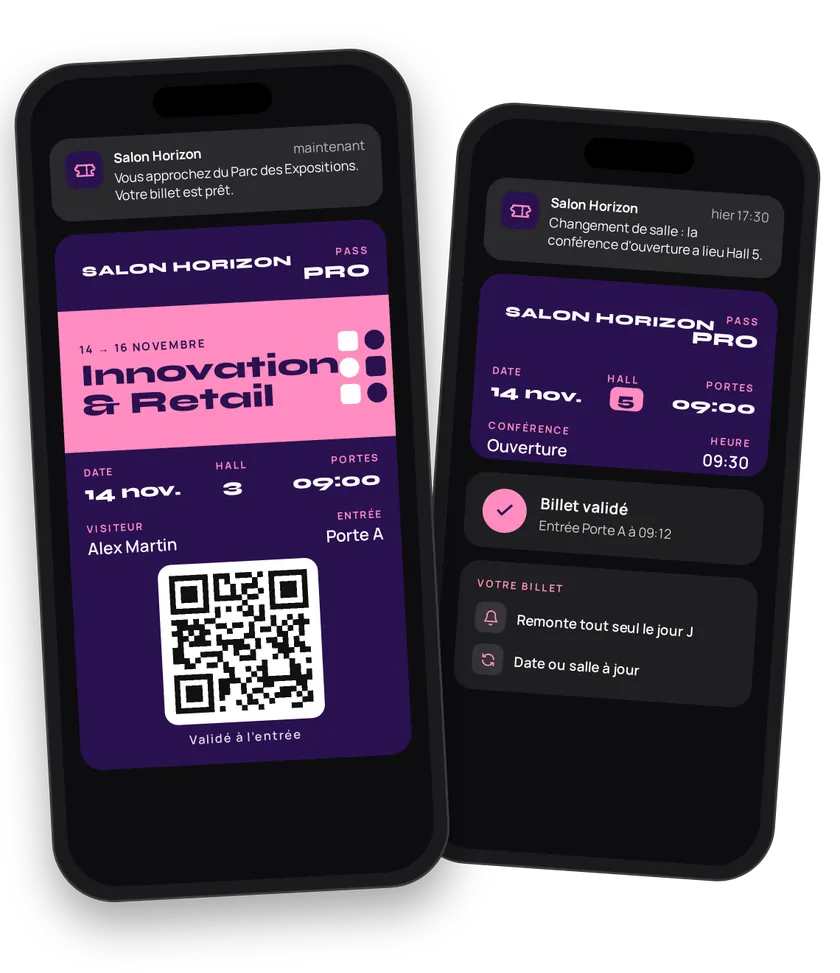
A PDF ticket gets lost in the inbox. An Apple Wallet or Google Wallet ticket shows up on its own on the lock screen on the day, as the attendee nears the venue. You issue the ticket at purchase, update it if the date or venue changes, and redeem it at the door. Attendees have nothing to look for.
Try this pass liveFill in the form, watch the pass and the code update, then get it on your phone.Customer journey
Integration workflow
- Create the eventBack office
The event is the template shared by every ticket: name, description, start and end dates, door opening, price, terms, contact, website, colors and official strip. Add the venue location so the ticket shows up as attendees arrive. Finally, pick the three seating labels: left (
ZONE,ACCESS…), center (ROW), right (SEAT,PLACE…).- curl
- SDK Node.js
- nodejs
- php
- python
- java
- csharp
- go
- ruby
- CURL
curl -L 'https://api-v2.test.eldowallet.fr/events' \
-H 'Accept: application/json' \
-H 'x-lang: en' \
-H 'Authorization: Bearer <token>' \
-F 'strip=@"tech-fair.png"' \
-F 'name="Salon Tech 2026"' \
-F 'description="The technology fair: 3 halls, 200 exhibitors."' \
-F 'barcodeType="QR_CODE"' \
-F 'date="{\"startDate\":\"2026-11-12T09:00:00.000Z\",\"endDate\":\"2026-11-12T18:00:00.000Z\",\"doorOpeningHour\":\"2026-11-12T08:30:00.000Z\"}"' \
-F 'locations="[{\"latitude\":48.8323,\"longitude\":2.2875,\"address\":\"1 place de la Porte de Versailles, 75015 Paris\",\"locationName\":\"Paris Expo\"}]"' \
-F 'PKTextAlignmentLeft="ZONE"' \
-F 'PKTextAlignmentCenter="INACTIVE"' \
-F 'PKTextAlignmentRight="TYPE"' \
-F 'colors="{\"backgroundColor\":\"\#131313\",\"labelColor\":\"\#9ee00d\",\"foregroundColor\":\"\#ffffff\"}"' \
-F 'security="{\"enableOneTimeUse\":true,\"enableRotatingBarcode\":true}"' - Issue the ticket at purchaseYour server
Your ticketing system calls eldo wallet for each ticket, with the attendee's identity and the three seating values. If the attendee is already a client of your wallet, also pass their
clientId.- curl
- SDK Node.js
- nodejs
- php
- python
- java
- csharp
- go
- ruby
- CURL
curl -L 'https://api-v2.test.eldowallet.fr/events/$EVENT_ID/passes' \
-H 'Accept: application/json' \
-H 'Content-Type: application/json' \
-H 'x-lang: en' \
-H 'Authorization: Bearer <token>' \
--data-raw '{
  "firstName": "Sarah",
  "lastName": "Petit",
  "email": "sarah.petit@example.com",
  "leftRow": "Hall B",
  "rightRow": "VIP",
  "barcode": "ST26-000481"
}' - Issue in bulkYour server
Press, sponsor guests, corporate groups: up to 5,000 tickets in one request, processed asynchronously. See Send to non-clients.
- The attendee adds the ticketEnd customer
The ticket works offline and survives a phone change.
- Postpone, change venueYour server
One call on the event updates every ticket issued: new date, new address, new visual. Just one attendee changing seats? Update their ticket.
- Control accessYour server
The scanner reads the QR code. Look up the ticket by barcode, show the seating, then redeem. A second scan returns
PASS_ALREADY_REDEEMED. Scanned by mistake? Undo the redemption.- curl
- SDK Node.js
- nodejs
- php
- python
- java
- csharp
- go
- ruby
- CURL
curl -L -X POST 'https://api-v2.test.eldowallet.fr/passes/template/$EVENT_ID/redeem/ST26-000481' \
-H 'Accept: application/json' \
-H 'x-lang: en' \
-H 'Authorization: Bearer <token>' - Track attendanceYour server
List the event's tickets and their status to follow entries in real time.
Best practices
- One event per session. A ten-date tour is ten events. Reuse the same visual.
- Turn on one-time use and the rotating barcode for high-value events. Security options limit resale and screenshots.
- Declare the venue location. It's what puts the ticket on the lock screen. See Locations.
- Multipart: objects as JSON strings.
date,locations,colorsandsecuritygo as JSON strings in the form. It's the most common mistake. - Test the scanning flow on site before doors open: throughput, brightness, network inside the venue.
Go further
- Sport & clubs for match tickets
- Cinema
- Pass lifecycle
- Endpoints: POST
/eventsPOST/events/{id}/passesPATCH/events/{id}POST/passes/template/{templateId}/redeem/{barcode}
Get inspired
A Wallet ticket can stay with attendees before, during and after the event. Here are ideas to go further.
Like one of these ideas? Contact our team and we'll show you how to set it up.