Ferry tickets in Apple Wallet and Google Wallet
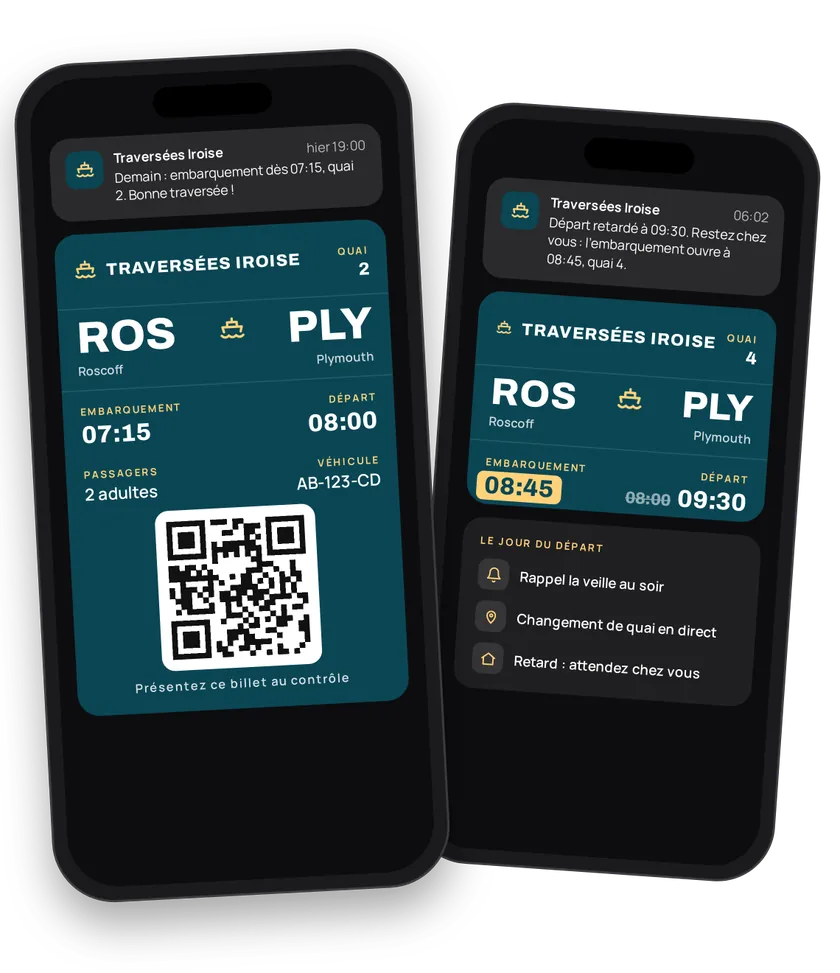
A crossing is planned the day before and lived in the 30 minutes before boarding. eldo wallet steps into both moments. The ticket is in Apple Wallet or Google Wallet from the moment of booking, the reminder arrives at the right time, and so does the dock change. On a delay, passengers wait at home, not on the quay.
Try this pass liveFill in the form, watch the pass and the code update, then get it on your phone.Customer journey
Integration workflow
- Create the crossing templateBack office
Use the
Boattype. Fill in the ports and their codes, reference times, fare, terms of carriage and customer service number. SetseatName=N_CABINEso the seat field shows as a cabin number. One template per route is enough.- curl
- SDK Node.js
- nodejs
- php
- python
- java
- csharp
- go
- ruby
- CURL
curl -L 'https://api-v2.test.eldowallet.fr/transits' \
-H 'Accept: application/json' \
-H 'x-lang: en' \
-H 'Authorization: Bearer <token>' \
-F 'strip=@"crossing.png"' \
-F 'type="Boat"' \
-F 'number="1"' \
-F 'originStationCode="MRS"' \
-F 'originName="Marseille"' \
-F 'destinationStationCode="AJA"' \
-F 'destinationName="Ajaccio"' \
-F 'departureTime="17:30"' \
-F 'arrivalTime="05:30"' \
-F 'seatName="N_CABINE"' \
-F 'details="Boarding closes 45 minutes before departure."' \
-F 'terms="Named ticket. ID required."' \
-F 'barcodeFormat="QR_CODE"' \
-F 'colors="{\"backgroundColor\":\"\#0b5a7a\",\"labelColor\":\"\#c8f15f\",\"foregroundColor\":\"\#ffffff\"}"' - Issue the ticket at bookingYour server
Your booking system calls eldo wallet for each ticket, with the sailing's
tripNumberand the cabin inseat. Add the passenger list and the vehicle on board as custom back fields (customBackFields). For a group, issue in bulk. - The passenger adds the ticketEnd customer
They open it from the confirmation email. No more PDF to print.
- Boarding reminderYour server
30 minutes before departure, your scheduling system sends a message to every holder on the sailing: "Boarding in 30 min, dock B6. Remember your ID."
- curl
- SDK Node.js
- nodejs
- php
- python
- java
- csharp
- go
- ruby
- CURL
curl -L 'https://api-v2.test.eldowallet.fr/transits/$TRANSIT_ID/passes/trip/MRS-AJA-20260718/notify' \
-H 'Accept: application/json' \
-H 'Content-Type: application/json' \
-H 'x-lang: en' \
-H 'Authorization: Bearer <token>' \
-d '{
  "message": "Boarding in 30 min, dock B6. Remember your ID."
}' - Dock change or delayYour server
Bad weather, one-hour delay: update the times on every ticket of the trip, then explain why with a message. Dock change? A message is enough.
- Change a passenger's bookingYour server
New cabin, an extra child, moved to another sailing: update the ticket concerned, including its
tripNumber. - BoardYour server
Staff scan the barcode. The ticket is looked up, then redeemed.
- Traveller card and upgradesYour server
Count crossings on the loyalty card ("8/10 crossings"). At the threshold, send a cabin upgrade coupon. Before summer, win back last year's passengers with a targeted coupon.
Best practices
- One
tripNumberper sailing, not per route. Monday's 17:30 and Tuesday's 17:30 are two different trips. - A family: how many tickets? One ticket per booking with the passenger list on the back works for group boarding. One ticket per passenger is needed if each person is checked separately.
- Warn early. A delay announced at home avoids a crowd on the quay. Trigger the update as soon as your operations system detects it.
- Set the expiry date. The ticket expires after the crossing.
Go further
- Transport & mobility, the same template for buses and trains
- Update a trip
- Push notifications
- Endpoints: POST
/transitsPOST/transits/{transitId}/passesPATCH/transits/{transitId}/passes/trip/{tripNumber}POST/transits/{transitId}/passes/trip/{tripNumber}/notify
Get inspired
A crossing is also the start of a holiday. Here are ideas to enrich your passengers’ experience.
Like one of these ideas? Contact our team and we'll show you how to set it up.