Gym membership cards in Apple Wallet and Google Wallet
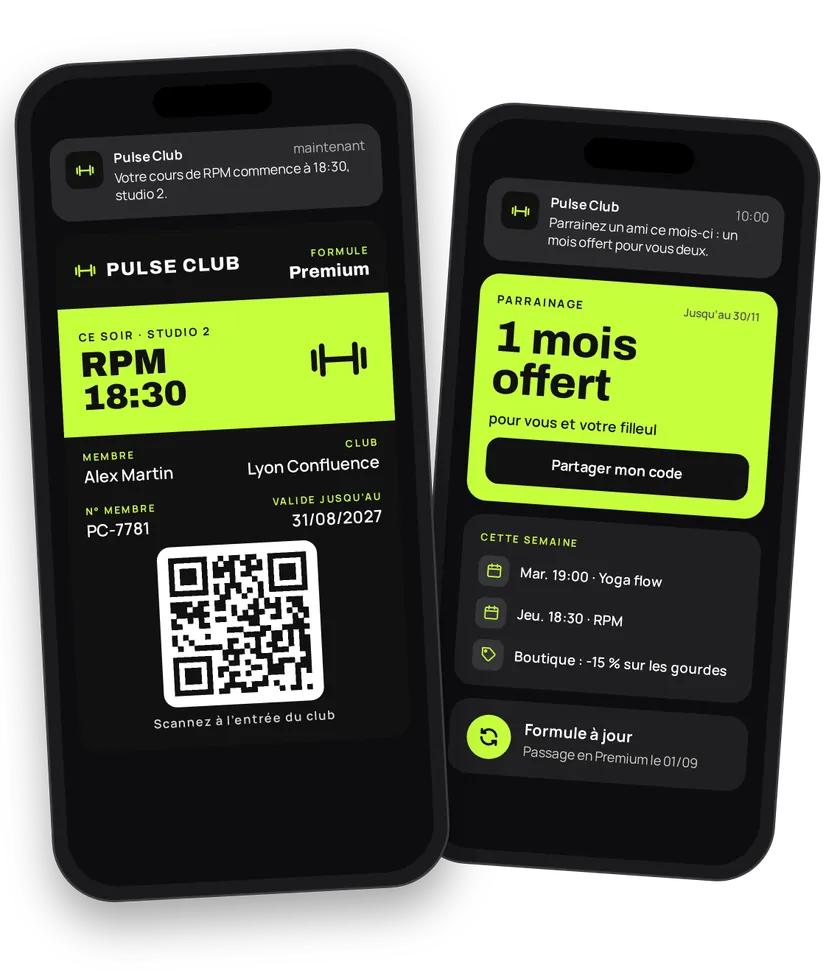
Members forget their plastic badge half the time. Never their phone. The member card in Apple Wallet or Google Wallet gets them into the club, shows their tier and receives your class reminders. You issue it at sign-up, update it when the tier changes, and keep it alive all year: classes, promotions, referrals, shop.
Try this pass liveFill in the form, watch the pass and the code update, then get it on your phone.Customer journey
Integration workflow
- Set up the member cardBack office
Pick
MEMBER_CARD, show the club (CLUB) and the member number (N_MEMBER). On iPhone, show the tier in the header (iosHeaderset toTYPE). Membership renewal happens on your side: keep a card with no expiry and track the due date with the member's renewal date. Turn off sharing.- curl
- SDK Node.js
- nodejs
- php
- python
- java
- csharp
- go
- ruby
- CURL
curl -L -X PATCH 'https://api-v2.test.eldowallet.fr/store-cards' \
-H 'Accept: application/json' \
-H 'x-lang: en' \
-H 'Authorization: Bearer <token>' \
-F 'strip=@"club-pulse.png"' \
-F 'cardType="MEMBER_CARD"' \
-F 'programName="Member card"' \
-F 'barcodeType="QR_CODE"' \
-F 'startRow="CLUB"' \
-F 'endRow="N_MEMBER"' \
-F 'iosHeader="{\"labelEnum\":\"CUSTOM_TEXT\",\"customLabel\":\"Tier\",\"valueEnum\":\"TYPE\"}"' \
-F 'validity="{\"expirationType\":\"NO_EXPIRATION\"}"' \
-F 'sharingProhibited="true"' \
-F 'sharingProhibitedAndroid="true"' \
-F 'colors="{\"backgroundColor\":\"\#1b1f3b\",\"labelColor\":\"\#ff7a45\",\"foregroundColor\":\"\#ffffff\"}"' - One tier, one client typeBack office
Essential, Premium, Student, Off-peak: each tier becomes a client type. Your access software uses it to apply your rules (opening hours, clubs included). See Client types.
- curl
- SDK Node.js
- nodejs
- php
- python
- java
- csharp
- go
- ruby
- CURL
curl -L 'https://api-v2.test.eldowallet.fr/client-types' \
-H 'Accept: application/json' \
-H 'Content-Type: application/json' \
-H 'x-lang: en' \
-H 'Authorization: Bearer <token>' \
-d '{
  "name": "Premium",
  "isDefault": false
}' - Issue the card at sign-upYour server
Your club management software creates the member as soon as they pay, with their member number as the barcode, their tier, sign-up date and renewal date. To move your current members to the wallet, import them in bulk. See Import a customer base.
- curl
- SDK Node.js
- nodejs
- php
- python
- java
- csharp
- go
- ruby
- CURL
curl -L 'https://api-v2.test.eldowallet.fr/clients' \
-H 'Accept: application/json' \
-H 'Content-Type: application/json' \
-H 'x-lang: en' \
-H 'Authorization: Bearer <token>' \
--data-raw '{
  "firstName": "Inès",
  "lastName": "Morel",
  "email": "ines.morel@example.com",
  "phoneNumber": "+33612345678",
  "barcode": "004127",
  "clientType": "$PREMIUM_TYPE_ID",
  "admissionDate": "2026-10-01T00:00:00.000Z",
  "renewalDate": "2027-10-01T00:00:00.000Z",
  "source": "CRM",
  "sendCard": true
}' - The member adds the cardEnd customer
They show it at the front desk, even offline.
- Remind those who haven't added their cardYour server
A few days after sign-up, remind members whose card isn't installed.
- Check access at the doorYour server
The front-desk scanner reads the barcode. Your access software looks up the member and reads their tier (
clientTypeName), pass status (passStatus) and renewal date (renewalDate). It then decides whether to open. An unknown barcode returnsMODEL_NOT_FOUND.- curl
- SDK Node.js
- nodejs
- php
- python
- java
- csharp
- go
- ruby
- CURL
curl -L 'https://api-v2.test.eldowallet.fr/clients/barcode/004127' \
-H 'Accept: application/json' \
-H 'x-lang: en' \
-H 'Authorization: Bearer <token>' - Change tier, renewYour server
Upgrade to Premium, renewal paid: update the type and the renewal date. The installed card updates.
- Remind about renewalYour server
30 days before the due date, schedule a notification (
type: SCHEDULED,category: INFORMATIVE) for the members concerned (target: SPECIFIC). - Class reminders and promotionsBack office
Reminder the day before a booked class, cancelled class, new timetable: a personal message per member. Back-to-school offer or open-house week: create a communication, the card's strip changes for the period. See Push notifications.
- curl
- SDK Node.js
- nodejs
- php
- python
- java
- csharp
- go
- ruby
- CURL
curl -L 'https://api-v2.test.eldowallet.fr/push-notifications' \
-H 'Accept: application/json' \
-H 'Content-Type: application/json' \
-H 'x-lang: en' \
-H 'Authorization: Bearer <token>' \
-d '{
  "defaultTitle": "Your class tomorrow",
  "defaultMessage": "See you tomorrow for your class.",
  "target": "SPECIFIC",
  "type": "SCHEDULED",
  "category": "INFORMATIVE",
  "scheduleAt": "2026-10-14T16:00:00.000Z",
  "clients": [
    {
      "id": "$CLIENT_ID_1",
      "message": "Inès, your yoga class starts tomorrow at 6 pm, studio 2."
    },
    {
      "id": "$CLIENT_ID_2",
      "message": "Hugo, your cross-training session starts tomorrow at 6:30 pm."
    }
  ]
}' - Referrals and shopYour server
A referred friend signs up: send a coupon to both the referrer and the new member (free month, coaching session). Shaker, protein, towel: a shop coupon for Premium members. At the desk, scan the coupon and redeem it.
- curl
- SDK Node.js
- nodejs
- php
- python
- java
- csharp
- go
- ruby
- CURL
curl -L 'https://api-v2.test.eldowallet.fr/coupons/$REFERRAL_COUPON_ID/passes/send' \
-H 'Accept: application/json' \
-H 'Content-Type: application/json' \
-H 'x-lang: en' \
-H 'Authorization: Bearer <token>' \
-d '{
  "clients": [
    {
      "clientId": "$SPONSOR_CLIENT_ID"
    },
    {
      "clientId": "$NEW_MEMBER_CLIENT_ID"
    }
  ]
}'
eldo wallet issues the card, updates it and answers the barcode lookup. The scanner, the turnstile and the decision to open stay in your access-control software.
Best practices
- Member number as the barcode. It's the number your software already knows: no mapping table.
- One card for the whole membership. On renewal, update the existing card rather than issuing a second one.
- Turn off sharing. The card is personal.
- A 2D scanner at the desk. 1D laser scanners can't read a QR code on a screen. Test with Apple and Google cards, with screen brightness turned down.
- Classes and timetable:
INFORMATIVE. Promotions and shop:COMMERCIAL. The category decides who gets the notification, based on their consent.
Go further
- Sport & clubs for stadium season passes and match tickets
- Client types
- Push notifications
- Barcodes
- Import a customer base
- Endpoints: PATCH
/store-cardsPOST/clientsGET/clients/barcode/{barcode}POST/push-notificationsPOST/coupons/{id}/passes/send
Get inspired
The membership card can motivate members at every session. Here are ideas to keep them for longer.
Like one of these ideas? Contact our team and we'll show you how to set it up.