Health insurance member cards in Apple Wallet and Google Wallet
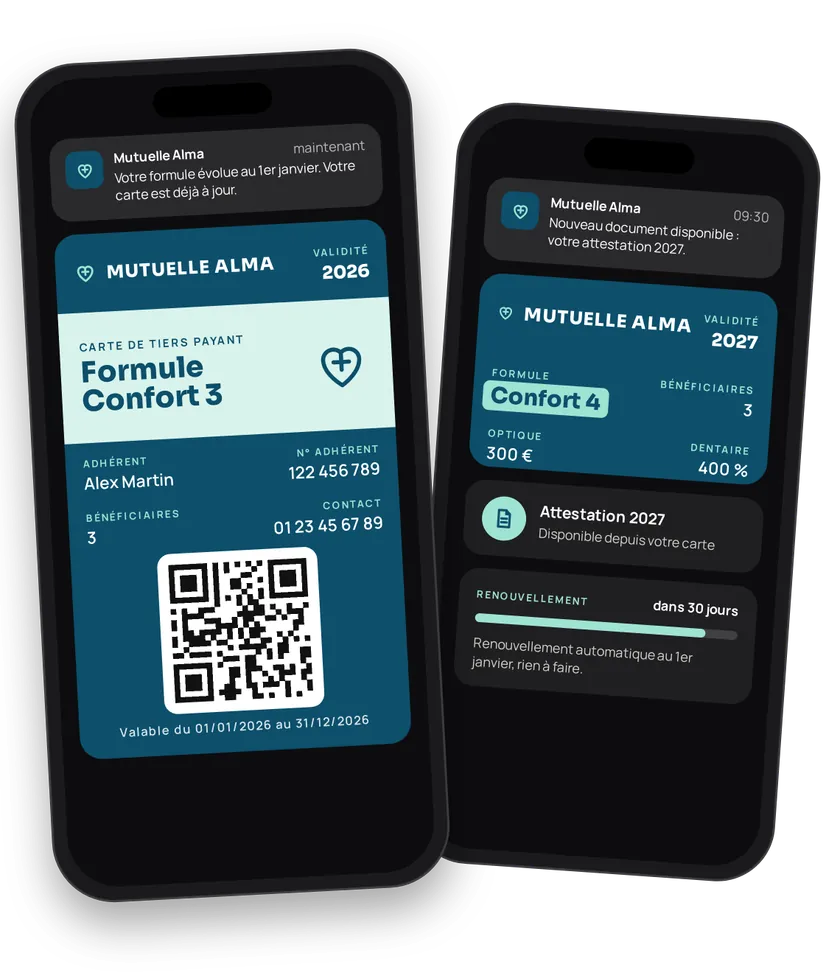
You support a member for years. A paper card goes stale the moment their plan changes. A member card in Apple Wallet or Google Wallet is always up to date: number, plan, coverage, contact. It serves as proof of membership and gives you a direct channel for renewal reminders and new documents.
Try this pass liveFill in the form, watch the pass and the code update, then get it on your phone.Customer journey
Integration workflow
- Set up the member cardBack office
Pick
MEMBER_CARD, show the member number (N_ADHERENT) and the organisation (ORGANISATION). Set validity: fixed date, after a period, or none. Add useful contacts (phone, member area) on the wallet. Turn off sharing.- curl
- SDK Node.js
- nodejs
- php
- python
- java
- csharp
- go
- ruby
- CURL
curl -L -X PATCH 'https://api-v2.test.eldowallet.fr/store-cards' \
-H 'Accept: application/json' \
-H 'x-lang: en' \
-H 'Authorization: Bearer <token>' \
-F 'cardType="MEMBER_CARD"' \
-F 'programName="Member card"' \
-F 'startRow="ORGANISATION"' \
-F 'endRow="N_ADHERENT"' \
-F 'barcodeType="QR_CODE"' \
-F 'validity="{\"expirationType\":\"AFTER_PERIOD\",\"expirationAfterPeriod\":\"1\",\"expirationPeriodType\":\"YEARS\",\"expirationOption\":\"AT_CREATION_DATE\"}"' \
-F 'sharingProhibited="true"' \
-F 'sharingProhibitedAndroid="true"' \
-F 'colors="{\"backgroundColor\":\"\#0d4f4a\",\"labelColor\":\"\#b5e03c\",\"foregroundColor\":\"\#ffffff\"}"' - One plan, one client typeBack office
Essential, Comfort, Premium: each plan becomes a client type. See Client types.
- Issue the card on sign-upYour server
Your back end creates the member once the membership is approved, with their number as the barcode, their type, admission date and renewal date. To digitise an existing base, import it in bulk (JSON up to 5,000 rows per call, or a CSV file). See Import a customer base.
- curl
- SDK Node.js
- nodejs
- php
- python
- java
- csharp
- go
- ruby
- CURL
curl -L 'https://api-v2.test.eldowallet.fr/clients' \
-H 'Accept: application/json' \
-H 'Content-Type: application/json' \
-H 'x-lang: en' \
-H 'Authorization: Bearer <token>' \
--data-raw '{
  "firstName": "Claire",
  "lastName": "Fontaine",
  "email": "claire.fontaine@example.com",
  "barcode": "104822",
  "clientType": "$COMFORT_TYPE_ID",
  "admissionDate": "2026-09-15T00:00:00.000Z",
  "renewalDate": "2027-09-15T00:00:00.000Z",
  "source": "CRM",
  "sendCard": true
}' - The member adds the cardEnd customer
They show it when asked, even offline.
- Remind those who haven't added their cardYour server
A week after sending, remind members whose card isn't installed: all of them, or a specific list.
- Keep the card up to dateYour server
Plan change, new renewal date: update the member. Remaining allowances, member-area link, assistance number: add them as additional information on the back.
- Remind about renewalYour server
60 days before the due date, schedule a notification (
type: SCHEDULED,category: INFORMATIVE) for the members concerned. - Inform and supportYour server
Certificate available, unused dental cover at year end, new teleconsultation service: a personal message per member (
target: SPECIFIC). - Sync your back endYour server
Set the wallet's webhook URL to receive
pass.installed,pass.uninstalledand client changes. Your advisor sees "digital card active". See Webhooks. - ReferralsYour server
The referral code is validated: send a coupon to both the referrer and the new member.
Best practices
- Keep health data off the card. Plan, member number and allowances are enough. Medical details stay in your secure member area.
- Member number as the barcode. That's what your advisor or partner will scan.
- Turn off sharing. The card is personal.
- Useful messages, not sales. Reminders, documents and remaining cover are
INFORMATIVE. Respect each member's communication preferences.
The wallet card does not replace the French national health card (carte Vitale). Whether health professionals and third-party payment schemes accept it as proof depends on your agreements with them.
Go further
- Associations & non-profits for another member card
- Client types
- Push notifications
- Webhooks
- Endpoints: POST
/clientsPATCH/clients/{id}POST/push-notificationsPOST/clients/reminder-inactive
Get inspired
The member card can become a real everyday link. Here are ideas to support your members.
Like one of these ideas? Contact our team and we'll show you how to set it up.