Hotel bookings in Apple Wallet and Google Wallet
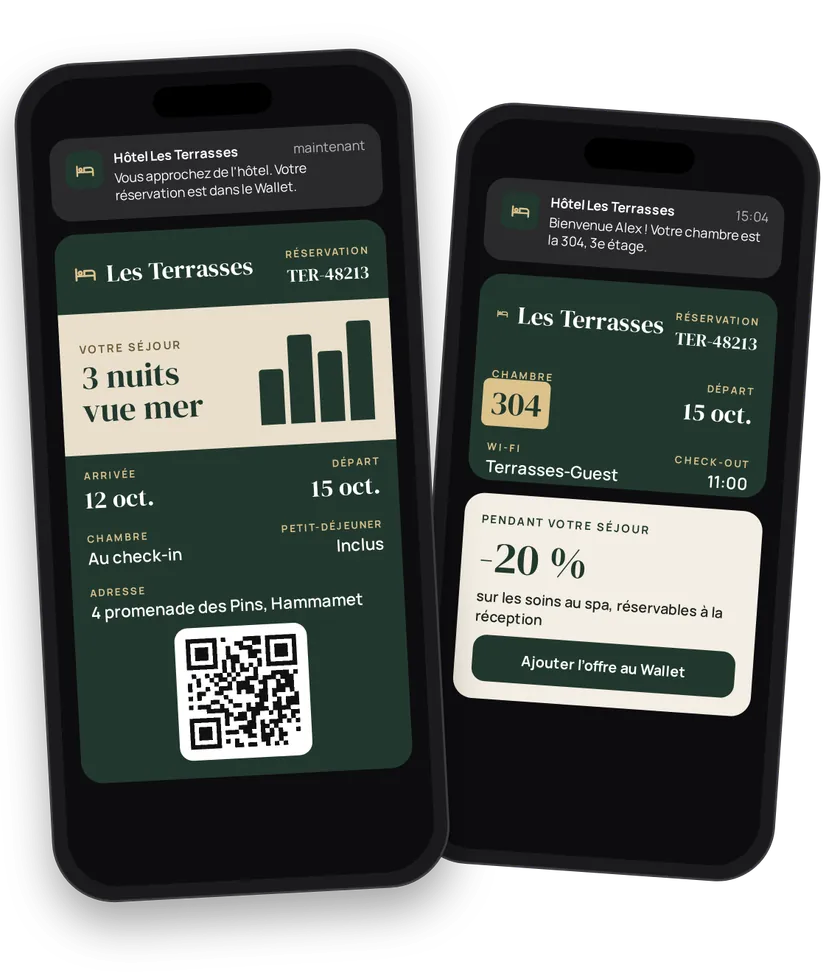
The guest booked three months ago. On arrival day, they dig through their email for the address and booking number. With a booking pass in Apple Wallet or Google Wallet, everything is in one place: dates, room, perks, address. The pass shows up as the guest nears the hotel, gets the room number at check-in and becomes the channel for your in-stay offers.
Try this pass liveFill in the form, watch the pass and the code update, then get it on your phone.Customer journey
Integration workflow
- Create the hotel templateBack office
One template per property: title, hotel name, description, included perks, colors, strip, barcode format and the property's location. The location brings the pass to the lock screen on arrival.
- curl
- SDK Node.js
- nodejs
- php
- python
- java
- csharp
- go
- ruby
- CURL
curl -L 'https://api-v2.test.eldowallet.fr/hotels' \
-H 'Accept: application/json' \
-H 'x-lang: en' \
-H 'Authorization: Bearer <token>' \
-F 'strip=@"front.jpg"' \
-F 'title="Your stay"' \
-F 'hotelName="Hôtel du Port"' \
-F 'description="Front desk open 24/7. Breakfast from 7 to 10:30 am."' \
-F 'barcodeFormat="QR_CODE"' \
-F 'colors="{\"backgroundColor\":\"\#f1f1e9\",\"labelColor\":\"\#4b6b0c\",\"foregroundColor\":\"\#131313\"}"' \
-F 'location="{\"latitude\":43.2951,\"longitude\":5.3639,\"relevantName\":\"Hôtel du Port\",\"relevantAddress\":\"12 quai du Port, 13002 Marseille\"}"' - Send the bookingYour server
On confirmation, your booking engine issues the pass with check-in and check-out dates, perks and a free back field (booking number, cancellation terms). For a group or a seminar, issue in bulk.
- curl
- SDK Node.js
- nodejs
- php
- python
- java
- csharp
- go
- ruby
- CURL
curl -L 'https://api-v2.test.eldowallet.fr/hotels/$HOTEL_ID/passes' \
-H 'Accept: application/json' \
-H 'Content-Type: application/json' \
-H 'x-lang: en' \
-H 'Authorization: Bearer <token>' \
--data-raw '{
  "firstName": "Claire",
  "lastName": "Dubois",
  "email": "claire.dubois@example.com",
  "checkin": "2026-07-14T15:00:00.000Z",
  "checkout": "2026-07-17T11:00:00.000Z",
  "backFieldName": "Booking",
  "backFieldContent": "No. HP-2026-0714-88. Free cancellation up to 48 hours before arrival."
}' - The guest adds the bookingEnd customer
Address, dates and hotel contact are one gesture away.
- Check-in: assign the roomYour server
On arrival, your PMS updates the pass with
roomNumber. The guest sees their room in the wallet. A cancellation? Set the pass tocanceled. - In-stay offersYour server
Breakfast, spa, late check-out: send the guest a coupon during their stay.
- Build loyalty after check-outYour server
Offer the brand's loyalty card and credit the nights stayed.
Best practices
- Send the pass at confirmation. The guest keeps it until the stay, even months later.
- Watch for overlapping dates. Two overlapping bookings for the same guest are rejected (
OVERLAPPING_DATES). See Common API errors. - Room number at check-in, not before. It often changes between booking and arrival.
- One strip per property. A photo of the front helps guests recognise the hotel on arrival.
Go further
- Locations
- Pass types
- Retail & fashion for the loyalty card
- Endpoints: POST
/hotelsPOST/hotels/{id}/passesPATCH/hotels/{id}/passes/{passId}
Get inspired
The booking pass stays with guests before, during and after their stay. Here are ideas to delight them.
Like one of these ideas? Contact our team and we'll show you how to set it up.