Employee badges in Apple Wallet and Google Wallet
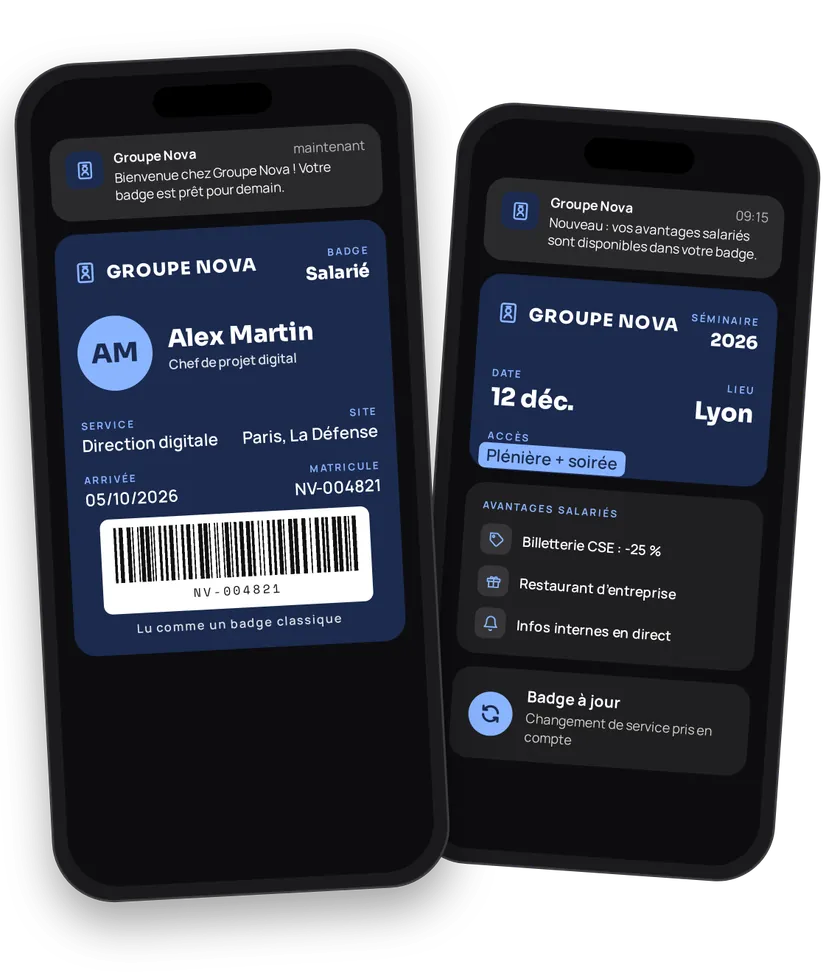
A plastic badge gets printed, lost, reprinted, and rarely comes back on the last day. An employee badge in Apple Wallet or Google Wallet is issued on day one, updated with every change and deleted on departure. Its barcode carries the employee ID: your systems read it like a regular badge. The same channel carries internal communications, employee perks and badges for your company events.
eldo wallet issues the badge, updates it and answers the barcode lookup. The reader, the access-control software and the time-tracking tool stay yours: they read the badge's barcode, then query eldo wallet or their own database. eldo wallet provides neither access hardware nor a time-tracking tool.
Employee journey
Integration workflow
- Set up the badgeBack office
Pick
MEMBER_CARD, show the company (ENTREPRISE) and the start date (ADMISSION_DATE). On iPhone, show the employee's name in the header (iosHeaderset toFULLNAME). Pick a barcode format your readers can scan:QR_CODE,CODE_128,PDF_417orAZTEC. Turn off sharing.- curl
- SDK Node.js
- nodejs
- php
- python
- java
- csharp
- go
- ruby
- CURL
curl -L -X PATCH 'https://api-v2.test.eldowallet.fr/store-cards' \
-H 'Accept: application/json' \
-H 'x-lang: en' \
-H 'Authorization: Bearer <token>' \
-F 'strip=@"atlas.png"' \
-F 'cardType="MEMBER_CARD"' \
-F 'programName="Employee badge"' \
-F 'barcodeType="QR_CODE"' \
-F 'startRow="ENTREPRISE"' \
-F 'endRow="ADMISSION_DATE"' \
-F 'iosHeader="{\"labelEnum\":\"CUSTOM_TEXT\",\"customLabel\":\"Employee\",\"valueEnum\":\"FULLNAME\"}"' \
-F 'validity="{\"expirationType\":\"NO_EXPIRATION\"}"' \
-F 'sharingProhibited="true"' \
-F 'sharingProhibitedAndroid="true"' \
-F 'colors="{\"backgroundColor\":\"\#1e293b\",\"labelColor\":\"\#38bdf8\",\"foregroundColor\":\"\#ffffff\"}"' - One status, one client typeBack office
Employee, temp, intern, contractor: each status becomes a client type. Your access control uses it to apply its rules (zones, hours). See Client types.
- Issue the badge on day oneYour server
Your HR system creates the employee when they join, with their work email, employee ID as the barcode, status, entity (
companyName) and start date. At launch, import all employees in bulk. See Import a customer base.- curl
- SDK Node.js
- nodejs
- php
- python
- java
- csharp
- go
- ruby
- CURL
curl -L 'https://api-v2.test.eldowallet.fr/clients' \
-H 'Accept: application/json' \
-H 'Content-Type: application/json' \
-H 'x-lang: en' \
-H 'Authorization: Bearer <token>' \
--data-raw '{
  "firstName": "Nadia",
  "lastName": "Benali",
  "email": "nadia.benali@atlas-industries.example",
  "barcode": "E-20418",
  "clientType": "$EMPLOYEE_TYPE_ID",
  "companyName": "Atlas Industries Lyon",
  "admissionDate": "2024-03-04T00:00:00.000Z",
  "source": "CRM",
  "sendCard": true
}' - The employee adds the badgeEnd customer
They show it to the reader, even with no network on their phone.
- Access and time tracking by your systemYour server
Your reader scans the barcode. Your access-control or time-tracking software looks up the employee by ID, checks their type (
clientTypeName) and pass status (passStatus), then opens the door or records the clock-in in its own tool. An unknown ID returnsMODEL_NOT_FOUND.- curl
- SDK Node.js
- nodejs
- php
- python
- java
- csharp
- go
- ruby
- CURL
curl -L 'https://api-v2.test.eldowallet.fr/clients/barcode/E-20418' \
-H 'Accept: application/json' \
-H 'x-lang: en' \
-H 'Authorization: Bearer <token>' - Visitor and seminar badgesYour server
Seminar, annual convention, open day, customer visit: create an event, then issue a badge to each attendee. Employees: pass their
clientId. Visitors: first name, last name and email are enough. At reception, scan the badge and redeem it. See Events & trade fairs.- curl
- SDK Node.js
- nodejs
- php
- python
- java
- csharp
- go
- ruby
- CURL
curl -L 'https://api-v2.test.eldowallet.fr/events/$EVENT_ID/passes/bulk' \
-H 'Accept: application/json' \
-H 'Content-Type: application/json' \
-H 'x-lang: en' \
-H 'Authorization: Bearer <token>' \
--data-raw '{
  "items": [
    {
      "firstName": "Nadia",
      "lastName": "Benali",
      "email": "nadia.benali@atlas-industries.example",
      "clientId": "$CLIENT_ID",
      "leftRow": "Employee"
    },
    {
      "firstName": "Marc",
      "lastName": "Lefèvre",
      "email": "marc.lefevre@example.com",
      "leftRow": "Visitor"
    }
  ]
}' - Internal communicationsBack office
Site closed today, evacuation drill, benefits enrolment now open: an
INFORMATIVEnotification to every badge holder, or to a list (target: SPECIFIC). For an internal campaign (safety week, charity drive), create a communication: the badge's strip changes for the period. See Push notifications. - Employee perksYour server
Works council offers, partner discounts, a free meal at the staff restaurant: send a coupon to the employees concerned. The partner or the till scans and redeems it.
- curl
- SDK Node.js
- nodejs
- php
- python
- java
- csharp
- go
- ruby
- CURL
curl -L 'https://api-v2.test.eldowallet.fr/coupons/$PERK_COUPON_ID/passes/send' \
-H 'Accept: application/json' \
-H 'Content-Type: application/json' \
-H 'x-lang: en' \
-H 'Authorization: Bearer <token>' \
-d '{
  "clients": [
    {
      "clientId": "$CLIENT_ID"
    },
    {
      "clientId": "$OTHER_CLIENT_ID"
    }
  ]
}' - Internal movesYour server
New status or new site: update the type and the entity. Department, HR contact, emergency number: add them as additional information on the back. The installed badge updates.
- OffboardingYour server
On the last day, your HR system deletes the employee in eldo wallet, by ID or by employee number. The same day, deactivate the employee ID in your access control: it's the one that decides to open the door.
- curl
- SDK Node.js
- nodejs
- php
- python
- java
- csharp
- go
- ruby
- CURL
curl -L -X DELETE 'https://api-v2.test.eldowallet.fr/clients/barcode/E-20418' \
-H 'Accept: application/json' \
-H 'x-lang: en' \
-H 'Authorization: Bearer <token>'
Best practices
- Employee ID as the barcode. It's the identifier your systems already know.
- No sensitive data on the badge. Name, entity and start date are enough. Pay, reviews and health data stay in your HR system.
- Offboarding happens on both sides. Delete in eldo wallet and deactivate in your access control, on the same day.
- Plan a fallback mode. The badge displays offline, but the barcode lookup needs network on the reader side. Keep a local list of active IDs in your access system.
- Test your readers. A 1D laser reader can't scan a QR code on a screen. Test with Apple and Google badges before rollout.
- Turn off sharing. The badge is personal.
Go further
- Events & trade fairs for event tickets
- Barcodes
- Client types
- Import a customer base
- Webhooks
- Endpoints: POST
/clientsGET/clients/barcode/{barcode}POST/events/{id}/passes/bulkPOST/coupons/{id}/passes/sendDELETE/clients/{id}
Get inspired
The Wallet badge can support the whole employee experience. Here are ideas to go further.
Like one of these ideas? Contact our team and we'll show you how to set it up.