Apple Wallet and Google Wallet loyalty cards for retail
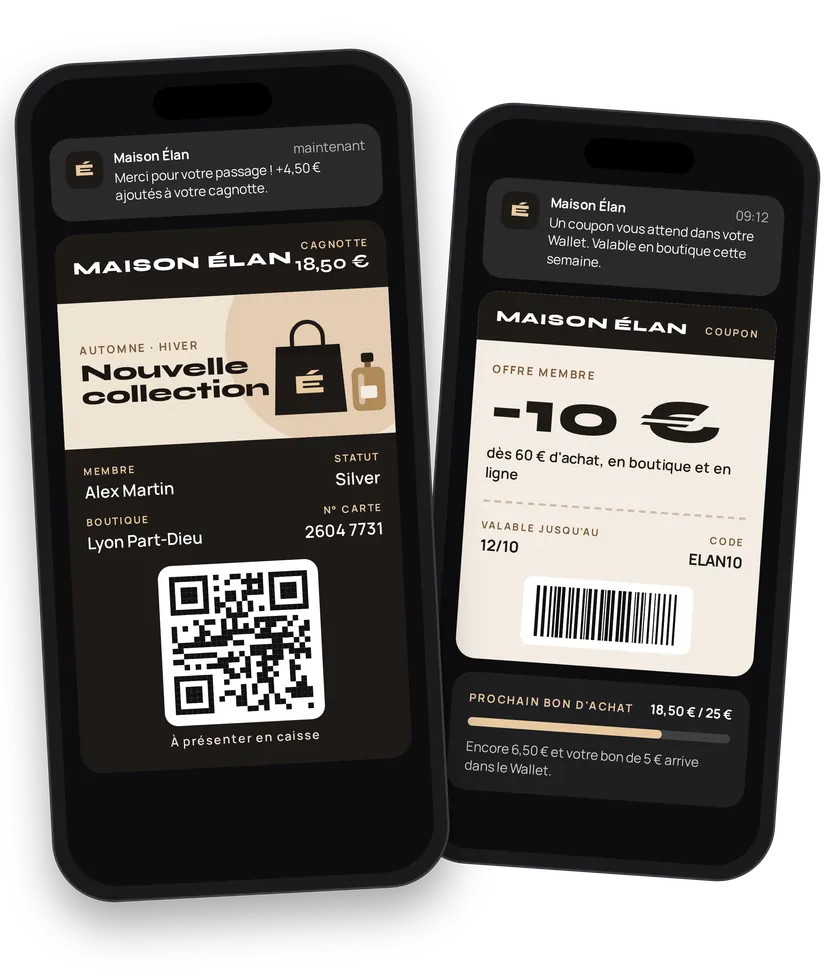
Clothes, shoes or cosmetics: the journey is always the same. Sign them up, keep them engaged, reward them. eldo wallet replaces the plastic card with a digital loyalty card that lives on the phone, in Apple Wallet or Google Wallet. Customers find it on their lock screen, watch their balance grow at every checkout and get coupons without opening a single email.
Try this pass liveFill in the form, watch the pass and the code update, then get it on your phone.Customer journey
Integration workflow
- Set up the loyalty cardBack office
There is one loyalty card (store card) per wallet. Set it up once: type (
STORE_CARDorMEMBER_CARD), program name, colors, strip, gain label and unit (POINTS,EURO…) and the three fields shown on the card. Logo, icon and contacts live on the wallet. Do it in the back-office or through the API. - Segment your customersBack office
Create one client type per tier: Member, Silver, Gold. See Client types.
- Declare your storesBack office
Add the GPS coordinates of your stores and a short message per location, optionally per time slot. When the customer walks by, the card shows up on their lock screen. See Locations.
- Create coupon templatesBack office
Create one coupon per mechanic: welcome (
isWelcomeCoupon), birthday, tier reward, win-back. Each coupon is a reusable template: name, description, value, promo code, expiry, strip and barcode format. The body ismultipart/form-data: objects (colors,security) are sent as JSON strings.- curl
- SDK Node.js
- nodejs
- php
- python
- java
- csharp
- go
- ruby
- CURL
curl -L 'https://api-v2.test.eldowallet.fr/coupons' \
-H 'Accept: application/json' \
-H 'x-lang: en' \
-H 'Authorization: Bearer <token>' \
-F 'strip=@"birthday.png"' \
-F 'name="Birthday"' \
-F 'description="20% off for 30 days, for your birthday"' \
-F 'value="20%"' \
-F 'barcodeFormat="QR_CODE"' \
-F 'colors="{\"backgroundColor\":\"\#59358b\",\"labelColor\":\"\#f2fbce\",\"foregroundColor\":\"\#ffffff\"}"' \
-F 'security="{\"enableOneTimeUse\":true}"' - Enroll customersYour server
On every sign-up (checkout, website, app), your CRM creates the client. eldo wallet generates the card. With
sendCard: true, eldo wallet sends the add link. Otherwise, take the link from the response and share it through your own channels. For an existing customer base, import in bulk (JSON or CSV).- curl
- SDK Node.js
- nodejs
- php
- python
- java
- csharp
- go
- ruby
- CURL
curl -L 'https://api-v2.test.eldowallet.fr/clients' \
-H 'Accept: application/json' \
-H 'Content-Type: application/json' \
-H 'x-lang: en' \
-H 'Authorization: Bearer <token>' \
--data-raw '{
  "firstName": "Marie",
  "lastName": "Martin",
  "email": "marie.martin@example.com",
  "phoneNumber": "+33612345678",
  "birthDate": "1990-04-12T00:00:00.000Z",
  "source": "CRM",
  "sendCard": true
}' - The customer adds the cardEnd customer
They open the link on their phone. iPhone: Apple Wallet. Android: Google Wallet. One tap, the card is installed.
- Sync card holders back to your CRMYour server
Set a webhook URL on the wallet: you receive
pass.installedandpass.uninstalled. Or query the client list filtered by status. Your sales staff can see who has the card. See Webhooks. - Credit the balance on every purchaseYour server
Your POS scans the card and sends the customer's gain, by barcode or by ID. eldo wallet updates the card in the wallet.
- curl
- SDK Node.js
- nodejs
- php
- python
- java
- csharp
- go
- ruby
- CURL
curl -L -X PATCH 'https://api-v2.test.eldowallet.fr/clients/barcode/$BARCODE/gain' \
-H 'Accept: application/json' \
-H 'Content-Type: application/json' \
-H 'x-lang: en' \
-H 'Authorization: Bearer <token>' \
-d '{
  "gain": 31.4
}' - Send coupons at the right timeYour server
Birthday today, 500-point tier reached, no purchase in 60 days: your CRM spots the event and sends the coupon. For a known customer, pass their
clientId. Sending is asynchronous: track the operation by its ID, or pass awebhookUrl.- curl
- SDK Node.js
- nodejs
- php
- python
- java
- csharp
- go
- ruby
- CURL
curl -L 'https://api-v2.test.eldowallet.fr/coupons/$COUPON_ID/passes/send' \
-H 'Accept: application/json' \
-H 'Content-Type: application/json' \
-H 'x-lang: en' \
-H 'Authorization: Bearer <token>' \
-d '{
  "clients": [
    {
      "clientId": "$CLIENT_ID"
    },
    {
      "clientId": "$OTHER_CLIENT_ID",
      "value": "25%"
    }
  ],
  "webhookUrl": "https://crm.example.com/hooks/eldo"
}' - Redeem the coupon at checkoutYour server
The POS scans the barcode and redeems the pass. A second scan is rejected (
PASS_ALREADY_REDEEMED). Scanned by mistake? Undo the redemption. See Pass lifecycle.- curl
- SDK Node.js
- nodejs
- php
- python
- java
- csharp
- go
- ruby
- CURL
curl -L -X POST 'https://api-v2.test.eldowallet.fr/passes/template/$COUPON_ID/redeem/$BARCODE' \
-H 'Accept: application/json' \
-H 'x-lang: en' \
-H 'Authorization: Bearer <token>' - Engage with notifications and offersBack office
Private sale for every card holder, or a personal message per customer from your CRM ("Your Click & Collect order is ready"). For a campaign, create a communication: the card's strip changes for the chosen period. See Push notifications.
- MeasureYour server
Pull client, coupon and notification stats into your dashboard. Cross them with your average basket and visit frequency.
Ready-made scenarios
| Scenario | Trigger | Calls |
|---|---|---|
| QR code at the till | Customer scans a QR printed from the back-office | None, no code |
| "Wallet card" button in the CRM | Sales assistant clicks on the customer record | POST/clients |
| Welcome coupon | A client signs up | Coupon created with isWelcomeCoupon |
| Happy birthday | Daily cron at 9 am | POST/coupons/{id}/passes/send |
| Live balance | Receipt rung up | PATCH/clients/barcode/{barcode}/gain |
| Private sale | Campaign launch | POST/communications |
| Click & Collect ready | Order marked "ready" | POST/push-notifications |
| We miss you | No purchase in 60 days | POST/coupons/{id}/passes/send |
Best practices
- One coupon template per mechanic. Don't create a new coupon for every send. Create "Birthday" once, send it every day.
- Own the link when it matters. With
sendCard: false, put the add link in your own welcome email, on your receipt or in your app. - Redeem server-side, not by hand. Redemption must come from the POS at scan time. That's what blocks double use.
- Respect consent. Every notification is
INFORMATIVEorCOMMERCIAL. A promotion is commercial: it only reaches customers who accept it. - Space out your notifications. One useful notification a week beats three promotions. Customers can turn off the pass's notifications, or delete it.
- Test on both platforms. Rendering differs between Apple Wallet and Google Wallet. See Apple Wallet or Google Wallet.
Go further
- Templates and passes
- Import a customer base
- Send a coupon to non-clients
- Client types for Silver, Gold, VIP cards
- A pass is not updating
- Endpoints: POST
/couponsPOST/coupons/{id}/passes/sendPATCH/clients/{id}/gainPOST/passes/template/{templateId}/redeem/{barcode}
Get inspired
Beyond the points balance and coupons, here are ideas retail brands love. Enough to surprise your customers and bring them back.
Like one of these ideas? Contact our team and we'll show you how to set it up.