Season passes and match tickets in Apple Wallet and Google Wallet
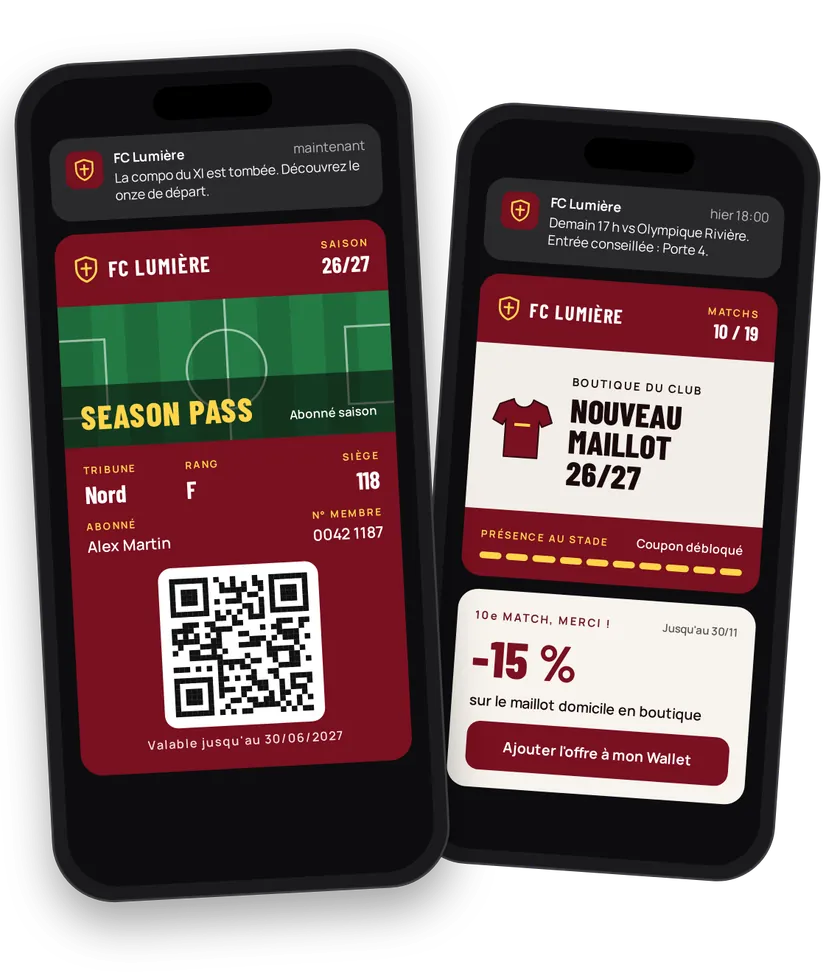
A fan wants three things: to be in the stadium, to know the line-up before anyone else, to wear the shirt. eldo wallet replaces the plastic season card with a card in Apple Wallet or Google Wallet. It opens the turnstile, gets the line-up the day before the match and receives club store offers.
Try this pass liveFill in the form, watch the pass and the code update, then get it on your phone.Customer journey
Integration workflow
- Set up the season cardBack office
The season card is the wallet's member card: type
MEMBER_CARD, program name, club colors, member number (N_MEMBER) and club (CLUB) in the displayed fields. Set validity to the end of the season.- curl
- SDK Node.js
- nodejs
- php
- python
- java
- csharp
- go
- ruby
- CURL
curl -L -X PATCH 'https://api-v2.test.eldowallet.fr/store-cards' \
-H 'Accept: application/json' \
-H 'x-lang: en' \
-H 'Authorization: Bearer <token>' \
-F 'strip=@"stand.png"' \
-F 'cardType="MEMBER_CARD"' \
-F 'programName="Season 2026-2027"' \
-F 'barcodeType="QR_CODE"' \
-F 'startRow="CLUB"' \
-F 'endRow="N_MEMBER"' \
-F 'colors="{\"backgroundColor\":\"\#7a1020\",\"labelColor\":\"\#ffd54a\",\"foregroundColor\":\"\#ffffff\"}"' \
-F 'validity="{\"expirationType\":\"AT_DATETIME\",\"expirationDate\":\"2027-06-30T23:59:59.000Z\"}"' \
-F 'sharingProhibited="true"' \
-F 'sharingProhibitedAndroid="true"' - One plan, one client typeBack office
Season holder, premium holder, free supporter: each plan becomes a client type. See Client types.
- Issue the card at sign-upYour server
When the season pass is confirmed, your ticketing system creates the fan with their type and renewal date. The card's barcode is the entry ticket. At the start of the season, create all holders in bulk.
- Match tickets outside the season passYour server
Cup ties, friendlies: create one event per match and issue the ticket. Pass the fan's
clientIdto link it to their record. See Events & trade fairs. - Bring the season to lifeBack office
Line-up the day before, 2-hour reminder with the entrance to use, new shirt in the store: a notification to every holder or a personal message. For a store offer, create a communication: the card's strip changes for the period.
- Control accessYour server
The turnstile reads the card's barcode. Your system finds the holder and checks their type and validity.
- Reward attendanceYour server
Your club counter goes up on every scan. At the 10th match, send the store coupon.
- Prepare the renewalYour server
30 days before the season pass ends, schedule a notification (
type: SCHEDULED) for the holders concerned. On renewal, update the holder's date and type.
Best practices
- One card, many seasons. On renewal, update the existing card instead of creating a second one.
- Turn off sharing on the season card so it doesn't travel between phones.
- Target notifications. Premium holders and free supporters don't expect the same messages.
- Line-ups and times:
INFORMATIVE. Store:COMMERCIAL. The category decides who receives the notification based on their consent. - Prepare match day. Test turnstiles with Apple and Google cards before the first home game.
Go further
- Gyms & fitness clubs for a gym member card
- Client types
- Push notifications
- Pass lifecycle
- Endpoints: PATCH
/store-cardsPOST/clientsPOST/events/{id}/passesPOST/push-notifications
Get inspired
A season card lives all season long. Here are ideas to make it indispensable to your fans.
Like one of these ideas? Contact our team and we'll show you how to set it up.