Transit tickets in Apple Wallet and Google Wallet
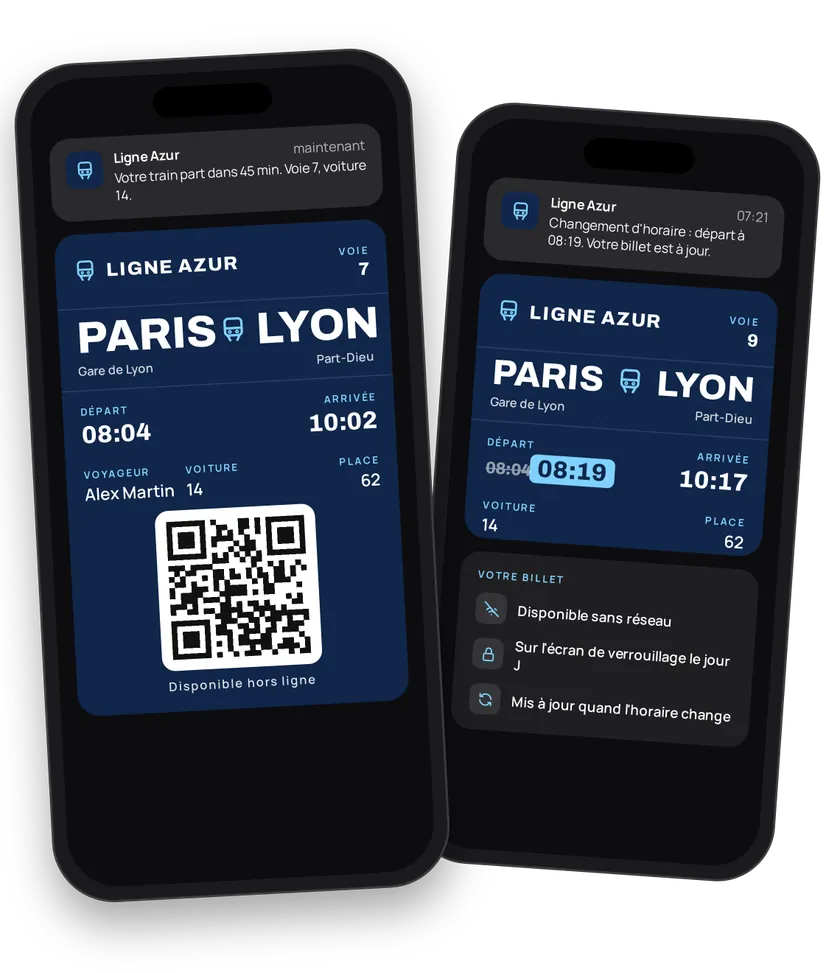
When you sell travel, your customer needs one thing: the right ticket, at the right time, without stress. eldo wallet puts the ticket in Apple Wallet or Google Wallet on their phone at booking. It works offline, shows up on the lock screen on departure day and updates itself when the schedule changes.
Try this pass liveFill in the form, watch the pass and the code update, then get it on your phone.Customer journey
Integration workflow
- Create the route templateBack office
A transit template holds what all tickets on a route share: type (
Bus,Train,Tram,Boat,Air,Generic), stations and codes, reference times, fare, terms, customer service number, colors, strip and barcode format. Create it once, in the back-office or through the API. The wallet must have the TRANSIT pass type enabled.- curl
- SDK Node.js
- nodejs
- php
- python
- java
- csharp
- go
- ruby
- CURL
curl -L 'https://api-v2.test.eldowallet.fr/transits' \
-H 'Accept: application/json' \
-H 'x-lang: en' \
-H 'Authorization: Bearer <token>' \
-F 'strip=@"banner.png"' \
-F 'type="Bus"' \
-F 'number="147"' \
-F 'originStationCode="MLH"' \
-F 'originName="Mulhouse"' \
-F 'destinationStationCode="GVA"' \
-F 'destinationName="Geneva"' \
-F 'departureTime="09:30"' \
-F 'arrivalTime="12:15"' \
-F 'details="Please arrive 15 minutes before departure."' \
-F 'terms="Named ticket, exchangeable until the day before."' \
-F 'barcodeFormat="QR_CODE"' \
-F 'colors="{\"backgroundColor\":\"\#0f3d5e\",\"labelColor\":\"\#9ee00d\",\"foregroundColor\":\"\#ffffff\"}"' \
-F 'security="{\"enableOneTimeUse\":true,\"disableIOSPassSharing\":true}"' - The traveller booksEnd customer
On your website, app, at the counter or through a reseller. Your ticketing system records the sale, then calls eldo wallet.
- Issue the ticketYour server
One call per traveller, with their contact details, dates, barcode and above all the
tripNumber. This number groups every ticket on the same service: it's what makes bulk updates possible.Two delivery options:
enableSendEmailOrSms: true: eldo wallet sends the email or SMS with the "Add to Wallet" button.enableSendEmailOrSms: false: you take the link from the response and share it yourself (confirmation email, app, QR code on a travel-agency ticket or a kiosk).
- curl
- SDK Node.js
- nodejs
- php
- python
- java
- csharp
- go
- ruby
- CURL
curl -L 'https://api-v2.test.eldowallet.fr/transits/$TRANSIT_ID/passes' \
-H 'Accept: application/json' \
-H 'Content-Type: application/json' \
-H 'x-lang: en' \
-H 'Authorization: Bearer <token>' \
--data-raw '{
  "firstName": "Loïc",
  "lastName": "Bernard",
  "email": "loic.bernard@example.com",
  "departureDate": "2026-11-12",
  "arrivalDate": "2026-11-12",
  "departureTime": "09:30",
  "arrivalTime": "12:15",
  "tripNumber": "MLH-GVA-20261112-0930",
  "seat": "14",
  "barcode": "TR-2026-000123",
  "expirationDate": "2026-11-13T00:00:00.000Z",
  "enableSendEmailOrSms": true
}' - Issue in bulkYour server
School groups, company outings, charters: send up to 5,000 tickets in one request. The operation runs asynchronously. Track its status by ID, or pass a
webhookUrlto be notified when it's done. - Announce a delay or a changeYour server
One call updates every ticket on the trip (times, stations, dates). To explain why ("30 min delay, weather"), also send a message to the
tripNumberholders. Full guide: Update a trip.- curl
- SDK Node.js
- nodejs
- php
- python
- java
- csharp
- go
- ruby
- CURL
curl -L -X PATCH 'https://api-v2.test.eldowallet.fr/transits/$TRANSIT_ID/passes/trip/MLH-GVA-20261112-0930' \
-H 'Accept: application/json' \
-H 'Content-Type: application/json' \
-H 'x-lang: en' \
-H 'Authorization: Bearer <token>' \
-d '{
  "departureTime": "09:00",
  "arrivalTime": "11:45"
}'- curl
- SDK Node.js
- nodejs
- php
- python
- java
- csharp
- go
- ruby
- CURL
curl -L 'https://api-v2.test.eldowallet.fr/transits/$TRANSIT_ID/passes/trip/MLH-GVA-20261112-0930/notify' \
-H 'Accept: application/json' \
-H 'Content-Type: application/json' \
-H 'x-lang: en' \
-H 'Authorization: Bearer <token>' \
-d '{
  "message": "Your departure has moved to 09:00."
}' - Fix a single ticketYour server
New date for one traveller, new seat, typo in the name: update their ticket without touching the others. Several fixes at once: use the bulk update.
- Validate at boardingYour server
The inspector scans the barcode. Your terminal looks up the ticket, then redeems it. A second scan is rejected. Turn on one-time use on the template to block a second boarding.
- Track issued ticketsYour server
List the tickets issued per route (
pageandlimitpagination) and follow stats by route, type and period. - Reward frequent travellersYour server
Add a traveller card: a trip counter on the loyalty card, and a "free trip" coupon on the 5th journey.
Best practices
- The
tripNumberis essential in practice. Without it, you'll have to update each ticket one by one when a delay hits. - Set an expiry date. The ticket expires after the trip and stays in the wallet history as a receipt.
- Separate data and message. Update the time with one call, explain the reason with another. Travellers understand what changed and why.
- Dates as
YYYY-MM-DD, times asHH:mm. If you change a trip's departure date, send the arrival date too. - Guard against sharing. The template's security options (one-time use, iOS sharing off, rotating barcode) limit resale and screenshots.
Go further
- Update a trip
- Ferry & maritime, same mechanics with cabins and docks
- Airlines, same mechanics with the
Airtype - Barcodes
- Pass lifecycle
- Endpoints: POST
/transitsPOST/transits/{transitId}/passesPATCH/transits/{transitId}/passes/trip/{tripNumber}POST/transits/{transitId}/passes/trip/{tripNumber}/notify
Get inspired
The ticket is only the start of the journey. Here are ideas to look after your travellers and bring them back.
Like one of these ideas? Contact our team and we'll show you how to set it up.